
Lithium batteries power everything from smartphones to electric watercraft like Wave-Vo's personal jet boats, but they don't last forever. Learning how to check lithium battery health with a multimeter gives you a clear picture of your battery's condition without expensive diagnostic equipment. Whether you're maintaining the 5.5kWh hot-swap battery on your Wave-Vo or testing cells in other devices, the process is straightforward once you know what to look for.
Battery degradation happens gradually, and by the time you notice shorter run times or sluggish performance, significant capacity loss may have already occurred. A quick voltage reading can reveal whether your cells are holding a proper charge or approaching the end of their useful life. This matters especially when you're relying on that battery for performance, nobody wants their ride cutting short halfway across the lake.
This guide walks you through safe, practical methods for testing lithium battery health using a standard multimeter. You'll learn what voltage readings indicate a healthy cell, how to identify warning signs of degradation, and when it's time to consider a replacement.
What battery health means for lithium batteries
Battery health represents the current condition of your lithium cells compared to their original factory specifications. When manufacturers rate a lithium battery at 5.5kWh or any other capacity, that number reflects what the battery can deliver when new. Over time, chemical reactions inside the cells reduce how much energy they can store and how efficiently they deliver power, which means your actual usable capacity drops even though the battery looks physically unchanged.
The three core metrics that define battery health
Understanding how to check lithium battery health starts with knowing what you're actually measuring. Voltage is the first metric, representing the electrical pressure the battery can provide. A fully charged lithium cell sits at 4.2 volts, while a depleted cell reads around 3.0 volts. Anything below 3.0 volts indicates damage or deep discharge that can permanently harm the cell.
Capacity measures the total energy your battery can store, expressed in amp-hours (Ah) or watt-hours (Wh). A battery rated at 50Ah when new might only deliver 40Ah after several hundred charge cycles. This 20% capacity loss directly translates to shorter run times, whether you're powering a Wave-Vo jet boat or any other lithium-powered device.
Internal resistance is the hidden killer of lithium battery performance, increasing as cells age and forcing them to work harder to deliver the same power.
Internal resistance acts like friction inside your battery. Fresh cells have minimal resistance, allowing current to flow freely. As cells age, this resistance increases, causing voltage to drop under load and generating excess heat. Higher internal resistance means your battery can't deliver full power when you need it most, like during acceleration or high-demand situations.
How degradation affects real-world performance
Your battery's health determines whether it can maintain voltage under stress. A degraded cell might show 4.1 volts at rest but drop to 3.5 volts when you draw 20 amps. This voltage sag reveals problems a simple resting voltage check would miss, which is why testing under load gives you a more accurate picture of actual health.
Temperature sensitivity increases as batteries degrade. Healthy lithium cells handle both hot and cold conditions reasonably well, but worn cells lose capacity faster in extreme temperatures. You'll notice this if your battery dies quickly on a cold morning or overheats during summer use, both signs that internal chemistry has changed.
Charge acceptance also declines with age. A healthy battery accepts the full charging current your charger provides, but degraded cells slow down charging or refuse to reach full voltage. If your battery takes twice as long to charge or stops at 95% instead of 100%, you're seeing capacity loss in real time. These symptoms tell you it's time to pull out your multimeter and get specific readings rather than guessing about battery condition.
Step 1. Do a safety inspection and set up
Before you test anything with a multimeter, you need to ensure the battery is safe to handle and your workspace won't create hazards. Lithium batteries store significant energy in a compact space, and damaged cells can vent toxic gases, catch fire, or even explode when mishandled. Your safety inspection catches potential problems before you make electrical connections that could trigger a failure.
Inspect the battery for physical damage
Start by examining the battery's exterior casing for any swelling, cracks, or punctures. A swollen battery indicates internal gas buildup from cell degradation or damage, and this condition makes the battery unstable. If you see bulging sides or a case that no longer sits flat, do not proceed with testing. Instead, place the battery in a fireproof container away from flammable materials and dispose of it properly at a battery recycling center.
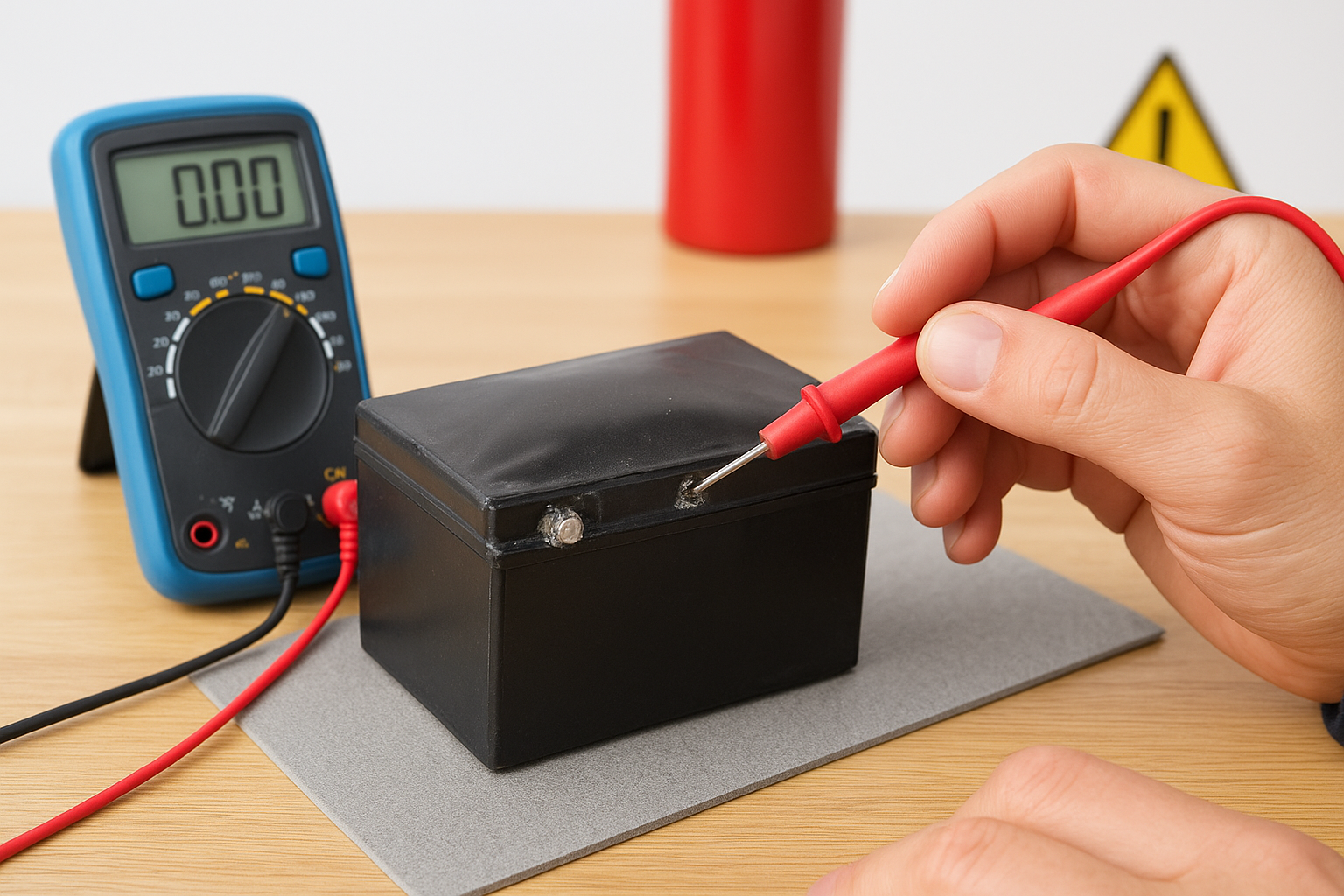
Check for any signs of leakage around terminals or seams. Lithium battery electrolyte appears as white crystals, brown staining, or sticky residue. Corroded terminals or discolored areas near connection points indicate that the battery has already failed internally. You should also smell the battery from a safe distance. A chemical or sweet odor suggests electrolyte leakage, another reason to stop immediately and safely contain the battery.
Never test a lithium battery that shows physical damage, swelling, or signs of leakage, as applying a multimeter to compromised cells creates serious fire and chemical exposure risks.
Look at the battery's age and cycle count if that information is available. Most lithium batteries handle 300 to 500 full discharge cycles before significant degradation. If you know your battery has exceeded its rated cycles or is more than three years old, expect lower performance even if it passes visual inspection.
Gather your testing equipment
You need a digital multimeter capable of reading DC voltage in the 0-5 volt range with at least 0.01-volt precision. Analog meters lack the accuracy required for lithium cell testing, where small voltage differences reveal important health information. Set your multimeter to the 20V DC range before making any connections, as this range provides sufficient headroom while maintaining readability.
Prepare a clean, dry work surface away from metal objects that could create accidental shorts. Place a non-conductive mat or wooden board under your battery. Keep a fire extinguisher rated for electrical fires within reach, and work in a well-ventilated area. These precautions ensure you can test safely while understanding how to check lithium battery health under controlled conditions.
Step 2. Measure resting voltage the right way
Resting voltage gives you the most accurate baseline reading of your battery's state of charge and overall condition. This measurement must happen when the battery has been disconnected from all loads and chargers for at least two hours, preferably overnight. Rushing this step produces misleading readings because batteries show artificially high voltage immediately after charging and artificially low voltage right after use.
Let the battery settle before testing
Your battery needs time to reach electrochemical equilibrium after charging or discharging. When you disconnect a charger, the voltage drops gradually over the next few hours as the chemical reactions inside the cells stabilize. Similarly, a battery used under load needs recovery time before the voltage returns to its true resting state. This settling period ensures you're measuring actual cell voltage rather than temporary surface charge or voltage depression.
Wait at least two hours after disconnecting any charger or load before testing. For the most accurate results when learning how to check lithium battery health, let the battery sit overnight at room temperature between 65°F and 75°F. Temperature affects voltage readings, so testing a cold battery from outside or a hot battery from recent use skews your measurements by 0.1 to 0.3 volts.
Connect your multimeter probes correctly
Touch the red probe to the positive terminal and the black probe to the negative terminal of your battery. Hold the probes firmly against the metal contacts for 3 to 5 seconds to ensure a stable reading. Your multimeter should display a steady voltage without fluctuation. If the numbers jump around, you have a poor connection or corroded terminals that need cleaning.
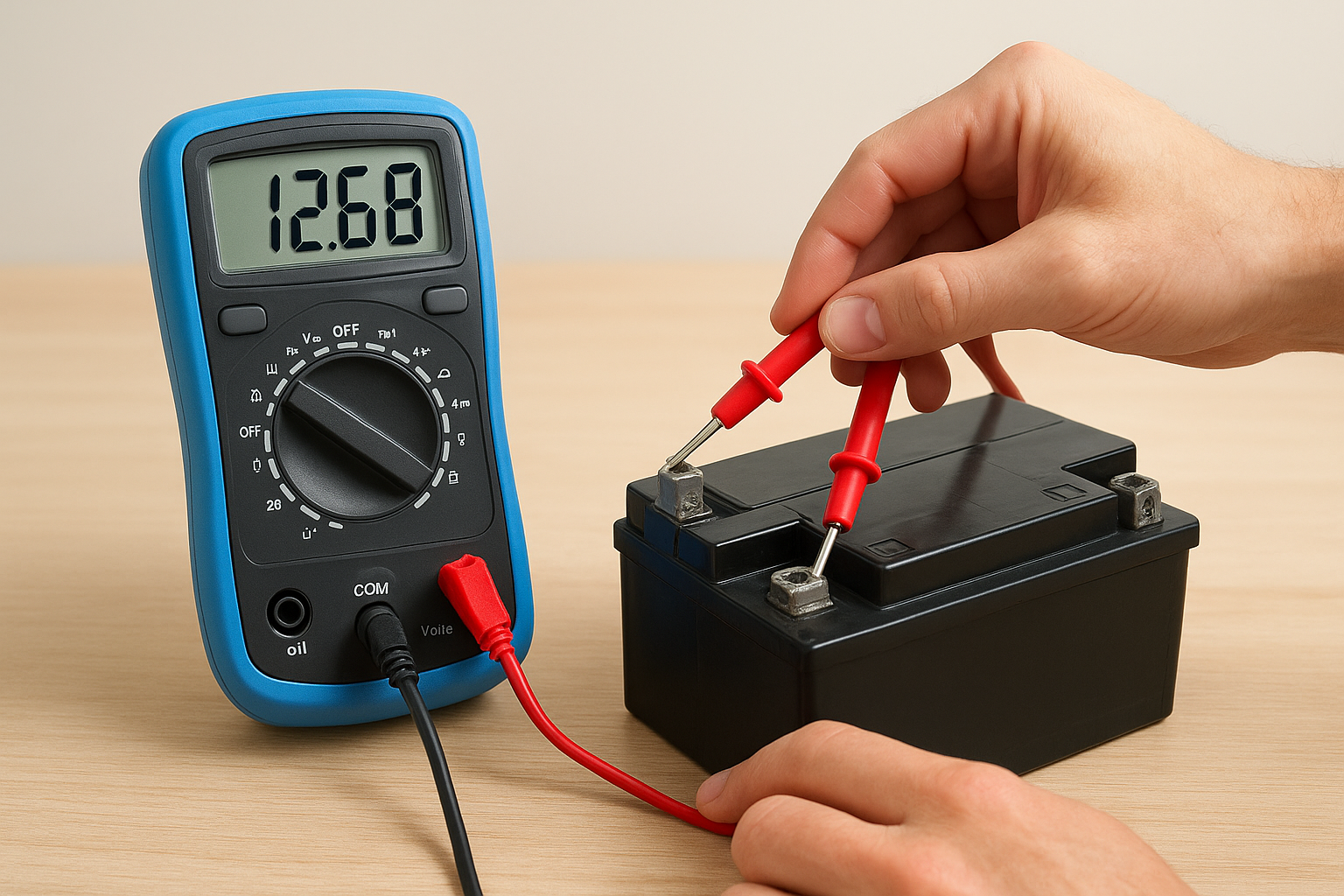
A fully charged lithium cell reads 4.2 volts at rest, while a cell at 3.7 volts sits at approximately 40% capacity, and anything below 3.0 volts indicates critical damage.
Interpret your voltage readings
Compare your measurement against these benchmarks for individual lithium cells:
| Voltage Reading | Battery State | Health Status |
|---|---|---|
| 4.2V | 100% charged | Normal if recently charged |
| 4.0V | 80-90% charged | Good condition |
| 3.7V | 40-50% charged | Standard resting voltage |
| 3.5V | 20-30% charged | Needs charging soon |
| 3.0V or below | Critical | Potential cell damage |
Your battery pack contains multiple cells in series, so multiply these values by the number of cells. A 4-cell pack should read 16.8 volts when fully charged and 14.8 volts at rest.
Step 3. Test voltage sag under a known load
Resting voltage tells you about state of charge but not performance capacity. A degraded battery can show perfect resting voltage yet collapse under load, which is why you need to test how voltage behaves when the battery actually delivers power. This load test reveals internal resistance problems that resting measurements miss entirely.
Choose and apply a controlled load
You need a resistive load that draws a consistent current from your battery for 10 to 30 seconds. For small batteries, a 12V automotive bulb works well, drawing 2 to 5 amps depending on wattage. For larger packs like the 5.5kWh battery in a Wave-Vo jet boat, use an electric motor or the actual device the battery powers, which provides a realistic load condition for testing.
Calculate your load current before testing. Divide the bulb's wattage by your battery's voltage to find amp draw. A 25-watt bulb on a 12V battery pulls approximately 2 amps. Connect your multimeter across the battery terminals while the load is active, not in series with the circuit. Keep the load connected for exactly 10 seconds, then disconnect it and watch the voltage recovery.
Testing voltage under a known load exposes internal resistance that causes healthy batteries to maintain voltage while degraded cells show dramatic drops of 0.5 volts or more.
Interpret the voltage drop pattern
Record the voltage immediately before applying load, during the 10-second load period, and 30 seconds after disconnection. A healthy lithium cell drops no more than 0.3 volts under moderate load and returns to within 0.1 volts of its original reading after rest. If you see a 0.5-volt drop or more during the test, your battery has elevated internal resistance that limits power delivery.
Compare these voltage sag benchmarks when learning how to check lithium battery health under load:
| Voltage Drop | Recovery Time | Battery Condition |
|---|---|---|
| 0.1-0.3V | 10-20 seconds | Excellent health |
| 0.3-0.5V | 20-40 seconds | Moderate degradation |
| 0.5-0.8V | 40-60 seconds | Poor condition |
| Over 0.8V | 60+ seconds | Replace immediately |
Batteries that fail to recover within one minute or show progressive voltage decline during the test have severe internal damage and cannot safely deliver rated power.
Step 4. Confirm capacity and internal resistance
The previous voltage tests reveal state of charge and immediate performance, but they don't tell you exactly how much energy your battery can store or how much internal resistance restricts power flow. A capacity discharge test gives you the definitive answer about remaining battery life, while internal resistance calculations explain why voltage drops occur. These measurements complete your understanding of how to check lithium battery health with precision.
Perform a controlled discharge test
You need to drain your battery at a constant current rate while measuring how long it takes to reach the cutoff voltage. Start with a fully charged battery reading 4.2 volts per cell, then connect a load that draws a known current. For accurate testing, use a dedicated battery capacity tester or a resistive load with an ammeter to verify steady current draw.
Set your discharge rate to 0.5C or lower for testing accuracy. If your battery is rated at 10Ah, discharge at 5 amps. Record the exact time from start until the battery reaches 3.0 volts per cell, which is the safe minimum voltage. Multiply the discharge current by the time in hours to calculate actual capacity. A 10Ah battery that sustains 5 amps for 1.6 hours delivers only 8Ah, indicating 20% capacity loss.
Your battery's actual capacity reveals more about health than any voltage reading, because capacity degradation directly determines how long your equipment runs between charges.
Track these capacity health ranges:
| Remaining Capacity | Health Status | Action Required |
|---|---|---|
| 90-100% | Excellent | Continue normal use |
| 80-89% | Good | Monitor more frequently |
| 70-79% | Fair | Plan replacement soon |
| Below 70% | Poor | Replace immediately |
Calculate internal resistance from your readings
Use your voltage sag data from Step 3 to determine internal resistance mathematically. Divide the voltage drop during load testing by the current you applied. If your battery dropped 0.4 volts under a 5-amp load, the internal resistance equals 0.08 ohms. Fresh lithium cells typically measure 0.02 to 0.05 ohms internally, while degraded cells exceed 0.1 ohms.
Higher internal resistance means wasted energy as heat and reduced power delivery capacity. Your Wave-Vo jet boat or any lithium-powered device suffers performance loss when internal resistance doubles from factory specifications, even if capacity remains acceptable. This metric explains why older batteries feel sluggish despite showing reasonable voltage readings.
Quick recap and next steps
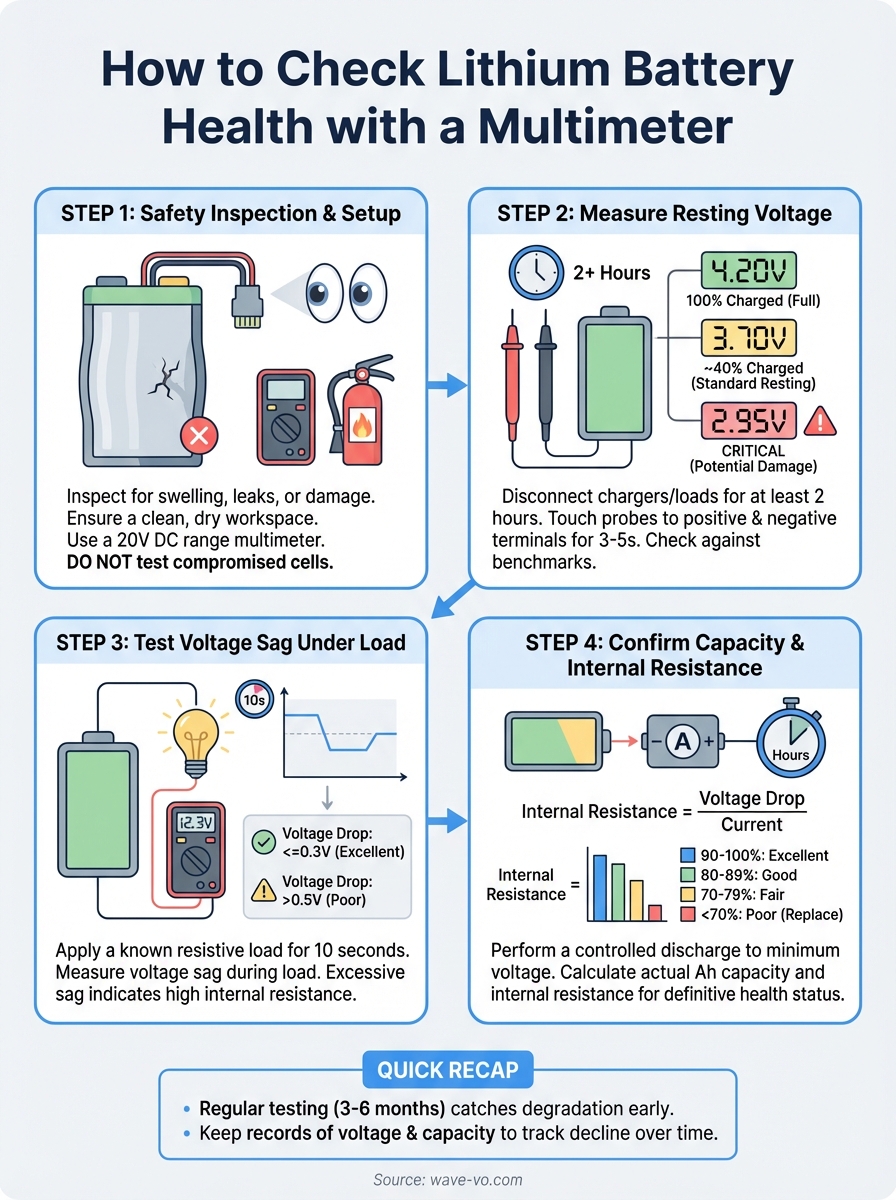
You now know how to check lithium battery health using four distinct testing methods. Start with a safety inspection to identify physical damage, then measure resting voltage after the battery has settled for at least two hours. Apply a controlled load to reveal internal resistance through voltage sag patterns, and finally run a discharge test to calculate actual capacity. Each method reveals different aspects of battery condition, giving you a complete health profile.
Your next step is putting this knowledge into practice. Test your batteries every three to six months to catch degradation early, especially if you rely on them for performance applications. Keep records of voltage readings and capacity measurements to track decline over time.
If you're maintaining the hot-swap battery system on a Wave-Vo electric jet boat or considering one for your lake adventures, regular health checks ensure you get maximum ride time before needing a replacement. Visit Wave-Vo to learn more about their efficient battery design and hot-swap convenience that keeps you on the water longer.